STRINGTABLE
Intro(StringTable | 打印 JVM StringTable) #
将虚拟机中的 StringTable 里面的字符全部打印出来,有两种方式,1:通过 jcmd 命令,2:借助 sun 下 hotspot 中的相关工具类编码。
jcmd 方式 #
Note
jcmd 里面有个命令是
VM.stringtable,可以查看 VM 里面的 stringtable,jdk 9以下好像没有这个命令 参考,会抛出:”java.lang.IllegalArgumentException: Unknown diagnostic command“错误,所以可以使用 jdk9 去诊断。可以使用 idea 中的 JDK 1.8 环境编译,然后运行使用 jdk9。
再运行:/Library/Java/JavaVirtualMachines/jdk-9.0.4.jdk/Contents/Home/bin/java -cp /Users/stevenobelia/Documents/project_idea_test/idea-test-project/_0_base-learning/target/classes _base.str.test.StringTest查看当前pid 为 36522,然后是用 JDK1.8 中的 jcmd 也可以查看
jcmd 36522 VM.stringtable -verbose。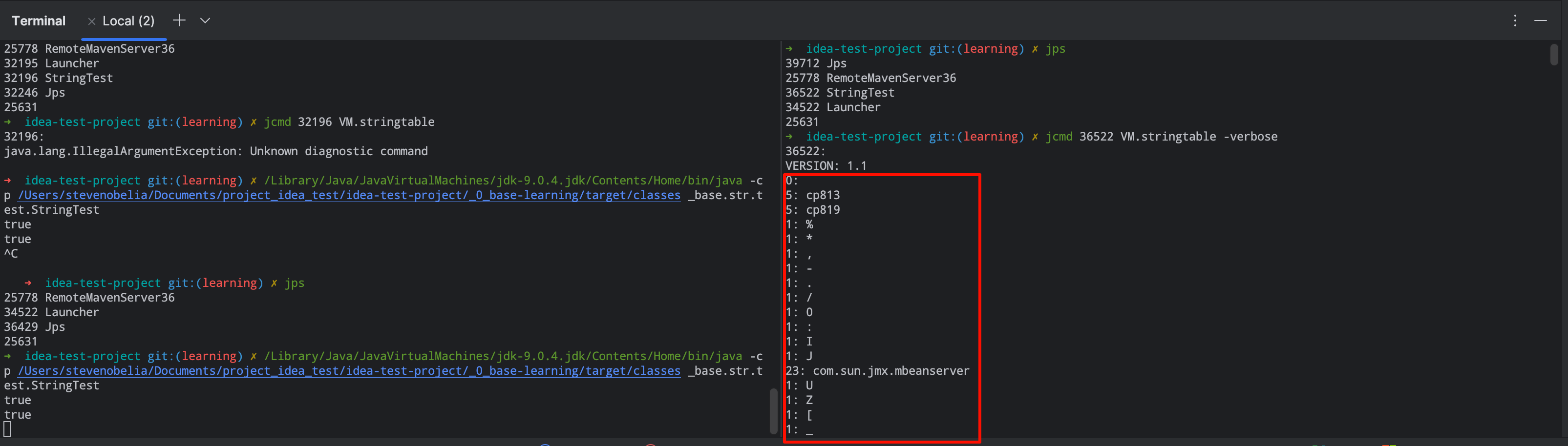
自己编码 #
Note
在 idea 中搜索 StringTable 的时候发现了处于
sun.jvm.hotspot.memory中的这个类,大概查看了一下,基本可以满足,然后结合sun.jvm.hotspot.tools.Tool工具,attach 到目标虚拟机上,获取相关信息。编码如下:不过在本地 MacOSX 上运行的时候,会出现如下错误:
ERROR: attach: task_for_pid(13871) failed: ‘(os/kern) failure’ (5)
Error attaching to process: sun.jvm.hotspot.debugger.DebuggerException: Can’t attach to the process. Could be caused by an incorrect pid or lack of privileges.
sun.jvm.hotspot.debugger.DebuggerException: sun.jvm.hotspot.debugger.DebuggerException: Can’t attach to the process. Could be caused by an incorrect pid or lack of privileges。
现在可以添加 sudo 权限去应对这个,但也有可能出现其他的问题,比如 Can’t attach symbolicator to the process。貌似是 MacOS 内核的安全策略问题。
暂时先选择切换平台(ubuntu 22.04, java-8-openjdk-amd64[1.8.0_482])。另外还需要注意可能会出现”Metadata does not appear to be polymorphic“之类的错误。
解决方案 参考:sudo apt-get install openjdk-8-dbg
Reference #
- https://0equalsto1.medium.com/internal-working-of-java-string-pool-interning-37cc892ae739
- https://github.com/puneetlakhina/javautils/blob/master/src/com/blogspot/sahyog/PrintStringTable.java
- https://stackoverflow.com/questions/33733445/java-heap-dump-error-metadata-does-not-appear-to-be-polymorphic # “Metadata does not appear to be polymorphic”
- https://stackoverflow.com/questions/64458776/why-can-some-jcmd-commandseg-vm-set-flag-can-not-be-used-on-all-pid